Categories
Communications Computers Networking

Windows 7 PPPoE-Protokoll schlecht implementiert?

Anläßlich eines Problems mit meinem Vodafone 16 MBit/s-DSL-Anschluss — Geschwindigkeit ging plötzlich dramatisch in die Knie, ca. 1-2 MBit/s nur noch! — habe ich testweise die PPPoE-Verbindung direkt vom Laptop unter Windows 7 über das Arcor-DSL Speed-Modem 200 zum Konzentrator bei Vodafone aufgebaut. Auf diese Weise wurde das Modem als “Schuldiger” ausgemacht: Ein baugleiches Ersatzmodem lieferte sofort über 14 MBit/s!.

Nachdem ich dann wieder das DSL-Modem mit dem TP-Link TL-WDR3500-Router (mit OpenWRT als Firmware) verkabelt hatte, stellte ich plötzlich erstaunt Folgendes fest: Die Ping-Round-Trip-Zeiten gingen von 31-32 ms (unter Windows 7 als PPPoE-Client) deutlich herunter auf 21 ms (mit OpenWRT Barrier Breaker r39582 als PPPoE-Client). Das ist insofern sehr erstaunlich, da ja nun eine 802.11an-WLAN-Strecke und der Router als zusätzliche Latenz erzeugende “Komponenten” hinzu kamen!

Ich interpretiere das so, dass die PPPoE-Implementierung unter OpenWRT der von Windows 7 deutlich überlegen ist, da sie offensichtlich “schneller” bzw. “effizienter” ist. Bevor jetzt jemand sagt “Vielleicht hast Du einen krötenlangsamen Laptop verwendet?” — nein, das ist nicht der Fall, es war ein Lenovo X220 mit einem Core i5-Prozessor mit 2.5 GHz…. Und der Laptop war dauernd “idle”… 🙂

Eure Meinung zu dieser Interpretation würde mich sehr interessieren, daher würde ich mich über Kommentare freuen.

Categories
Cell Phones

iPhone 4 Battery Repair

If you follow my blog you know that my old iPhone 4 suffered from the well-known issue of a swollen battery. I didn’t want to throw it away before checking the actual extent of the damage — maybe it could be repaired with little effort?!

So I spent 15 EUR and ordered a Pentalobe screwdriver and plastic opening tools from iFixIt Europe. Only a few days later I received the tools, and using the instructions they have on their website how to open the iPhone 4 and replace the battery it took me only 5 minutes to find out that there was no damage whatsoever to the inner of the iPhone: It was only the battery itself that was damaged (swollen), and the glass back cover that was glued into a plastic frame had become loose.

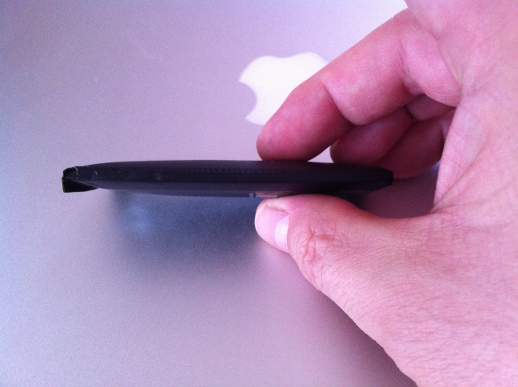
Here’s a picture of the old battery:

SwollenBattery

You can clearly see that the battery was not “flat”, but strongly swollen.

Therefore I decided to order a new battery. This time I ordered from eBay since a new battery could be had from there for only 12 EUR, while iFixIt would have charged me 30 EUR (both incl. shipping).

The actual repair was extremely easy: Just unplug the damaged one (after removing a tiny Philips screw that secured the battery plug), and then insert the new one into the iPhone, plugging in the battery cord into its socket, and secure it with the tiny Philips screw.

I also “repaired” the back cover by firmly pressing the glass plate onto the plastic frame. Luckily the glue was still strong enough to firmly hold the glass.

I then assembled the iPhone again, and plugged the charger in. After a couple of seconds, it started booting, and the charging process started, so the new battery seemed to at least not be D. O. A. 🙂

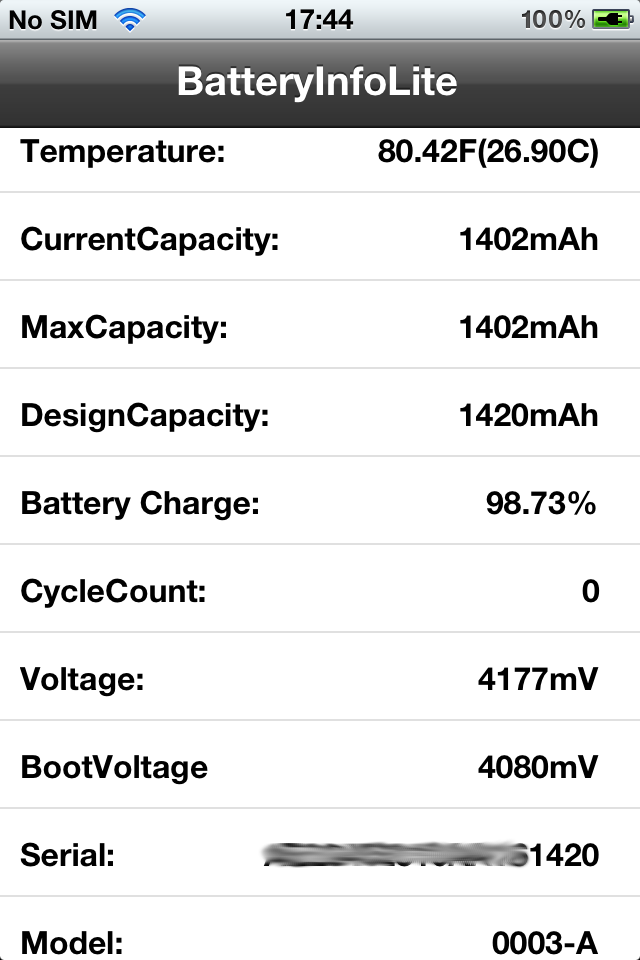
Since I had read comments on Amazon that obviously some people had received used batteries as replacement parts (some had already around 200 charge cycles!), I decided that I wanted to check my battery stats. There’s a tool in Cydia Store called BatteryInfoLite that will display extensive information about your iPhone’s battery, so I decided to jailbreak my phone (that still had iOS 5.0.1 installed) to get Cydia. I used redsn0w 0.9.13dev4, and within only a couple of minutes my device was jailbroken, and Cydia was installed.

Here’s a screenshot of what BatteryInfoLite displayed about my battery:

BatteryInfoLite

 The serial number that was displayed by the tool was identical to the one printed on the battery, which I regard as another indication of reasonable quality. The last 4 digits are obviously an indication of the battery’s design capacity.

I felt happy when the phone was working again. I will now use it as an MP3 player (which it essentially is, after all… ;-))

Categories
Cell Phones WTF

Don’t neglect your iPhone, or else… :-(

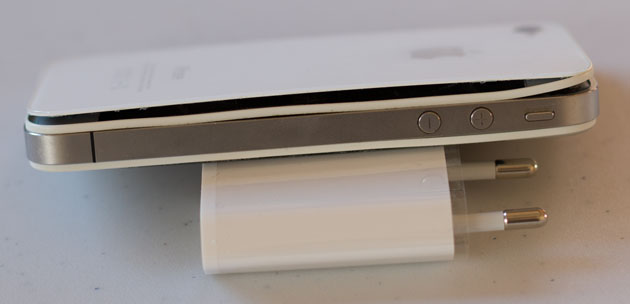
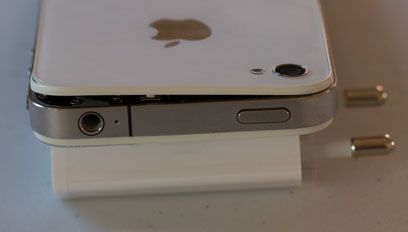
I did not use my iPhone4 for a while (since I have a Samsung Galaxy S4 now, which I like much more), and when I wanted to “revive” it recently as a music player I found that it had burst (no, I didn’t drop it, it was just lying around on my desk):

20130927T100213-IMG_0106

20130927T100257-IMG_0107Obviously the battery had swollen…

I immediately called the Apple dealer closest to my home and told them about it. They said it’s normal for a battery to burst if the device hasn’t been used for a while. They said I could buy a new iPhone 4 for a “mere” 190 EUR… 🙁

If you Google for this issue you will notice that it’s pretty common, still Apple cares a sh*t about it… I’ve never seen such major battery issues on any mobile phone I’ve owned before — and I had many!!!

Thanks, Apple. This is what you get when you buy from a “premium” manufacturer…

Needless to say that I will never buy an iPhone again…

Categories
Cell Phones

“Call Forwarding” setup on iPhone – what a stupid user interface design…

I’m using call forwarding a lot on my iPhone — every day after I left the office I forward calls to my voice mail, and next morning I cancel this forwarding. Also, in periods where I’m on-call I forward calls to my fixed line as soon as I arrive home, and I cancel this forwarding when I leave home so that I can be reached on my cell phone again…

Ok, here’s the thing I’m complaining about: When you want to enable call forwarding, you need to move the Call Forwarding switch from OFF to ON. This immediately enables call forwarding without giving you the chance to enter the number you want calls to be forwarded to. So if you’re frequently changing call forwarding destinations a lot as I do you will often end up setting a wrong destination for a short while until you have clicked the Forward to field and updated the destination phone number.

And, what’s really lame, you still cannot select a number from your phonebook as the destination, you have to manually key in the destination number — I already complained about that two years ago, and Apple still hasn’t fixed this in iOS 6.1.3. Unbelievable for the self-proclaimed leader in usability, Apple! My first cell phone 15 years ago could do that already…